
Test Environment Automation Explained: Your 2026 QA Guide

TL;DR:
- Test environment automation uses code to automatically provision, configure, and tear down test setups within CI/CD pipelines. It improves testing speed, reproducibility, and enables parallel execution, reducing delays and errors in agile development. Key technologies include Terraform, Ansible, Docker, Kubernetes, and ephemeral environments that ensure consistent, isolated testing.
Test environment automation is defined as the code-driven process of provisioning, configuring, and managing test environments automatically through Infrastructure as Code and CI/CD orchestration. Manual setup delays and environment drift are the two biggest threats to reliable software testing in agile delivery. This guide covers the core technologies, including Terraform, Ansible, Docker, and Kubernetes, along with the best practices your team needs to implement automated testing environments that actually hold up under pressure. Whether you are a QA professional or a developer integrating testing into your CI/CD pipeline, test environment automation explained clearly is the foundation you need.
How does test environment automation improve testing efficiency?
Test environment automation replaces manual provisioning with scripted, version-controlled infrastructure that spins up and tears down on demand. The result is faster feedback, fewer errors, and more reliable test results across every sprint.

The most direct benefit is speed. Manual provisioning is a major bottleneck in agile flow, forcing teams to wait on ticket queues and hand-offs before a single test can run. Automated provisioning eliminates that wait entirely.
The second benefit is reproducibility. Ephemeral environments created on demand eliminate environment drift, which is a leading cause of non-reproducible bugs, by starting each test from a version-controlled clean state. When every test run starts from the same baseline, your results are trustworthy.
Parallel testing becomes practical with automation. Your team can spin up isolated environments for multiple feature branches simultaneously, without infrastructure contention slowing anyone down. This directly shortens the feedback loop inside CI/CD pipelines, which is the core goal of continuous delivery.
Key efficiency gains your team can expect:
- Automated provisioning and teardown cut environment wait times from hours to minutes
- Parallel environments let multiple squads test simultaneously without blocking each other
- Version-controlled configurations make every environment reproducible and auditable
- Automated smoke checks after provisioning catch setup failures before tests even run
- Tighter CI/CD integration means test results reach developers while context is still fresh
Pro Tip: Set up automated smoke checks immediately after environment provisioning. A two-minute health check that confirms database connectivity and service availability saves hours of debugging failed tests caused by a broken environment rather than broken code.
What are the key technologies enabling test environment automation?
The technology stack behind automated testing environments is well-established in 2026. Each layer handles a specific concern, and they work together as a pipeline.
-
Terraform handles Infrastructure as Code for declarative cloud resource management. You define your infrastructure in configuration files, commit them to version control, and Terraform provisions the exact same cloud resources every time. This is the foundation of production parity in test environments.
-
Ansible manages configuration after infrastructure is provisioned. Where Terraform creates the servers and networks, Ansible installs software, sets environment variables, and applies configuration consistently across every instance.
-
Docker packages your application and its dependencies into containers. A Docker image built once runs identically in development, testing, and production, eliminating the classic “works on my machine” failure mode.
-
Kubernetes orchestrates containerized environments at scale. When your team needs to run 20 parallel test suites, Kubernetes manages the scheduling, scaling, and cleanup automatically.
-
Ephemeral environments are the operational model that ties these tools together. Ephemeral environments are temporary, isolated versions of your application created for a specific change and destroyed after use. They can last as little as the lifecycle of a single CI pipeline run, often just minutes.
The table below maps each technology to its role in the automation stack:
| Technology | Primary role | Key benefit |
|---|---|---|
| Terraform | Infrastructure provisioning | Declarative, version-controlled cloud resources |
| Ansible | Configuration management | Consistent software setup across environments |
| Docker | Application packaging | Identical runtime across all environments |
| Kubernetes | Container orchestration | Parallel scaling and automated cleanup |
| Ephemeral environments | Operational model | Zero drift, isolated per pipeline run |
Test data management is the layer most teams underestimate. Automated database seeding populates environments with realistic data before tests run. Masking protects sensitive production data while preserving its structure for accurate testing. Without this layer, even a perfectly provisioned environment produces unreliable results.
What are the best practices for implementing test environment automation?
Effective implementation follows a clear set of principles. Skipping any of them creates technical debt that compounds quickly.
Treat environment setup as code. Every configuration file, provisioning script, and dependency definition belongs in version control. Peer review for infrastructure changes catches errors before they reach shared environments. This practice also creates a full audit trail for compliance and debugging.
Focus production parity where it matters. Perfectly mirroring production in test environments causes cost and maintenance problems. Prioritize schema parity and critical integrations. Reserve full production-like environments for regression and performance validation, not every unit test run.
Automate teardown without exception. Environments that are not destroyed after use accumulate costs and create configuration drift. Every provisioning script must include a teardown step triggered automatically on pipeline completion or failure.
Use service virtualization for unstable dependencies. Service virtualization and mocks reduce the need for full production-like environments for every test case. When a third-party API is unreliable or unavailable in test, a mock gives your tests a stable target. This approach balances fidelity and cost efficiency without sacrificing test coverage.
Common pitfalls to avoid:
- Automating a chaotic process without standardizing it first. Automation amplifies existing configuration chaos rather than fixing it, so document and stabilize your environment management processes before scripting them.
- Skipping environment health dashboards. Without visibility into environment state and dependencies, failures are hard to diagnose and even harder to prevent.
- Allowing manual overrides to provisioned environments. A single manual change breaks reproducibility and invalidates the entire test run.
- Ignoring naming conventions and ownership. Every environment needs a clear owner, a build version tag, and a defined expiry to prevent orphaned resources.
Pro Tip: Before writing a single Terraform file, map every dependency your application has in a test context. External APIs, databases, message queues, and auth services all need a defined strategy: real instance, mock, or virtualized service. This map becomes your environment design document.
How to create a test environment setup checklist for effective automation?
A test environment setup checklist prevents gaps that cause test failures unrelated to your code. The checklist below covers the eight areas every team must address.
| Checklist area | Key actions |
|---|---|
| Infrastructure requirements | Define cloud provider, region, instance types, and network topology in IaC files |
| Environment configuration | Specify networking rules, storage volumes, access controls, and environment variables |
| Test data provisioning | Automate database seeding with realistic data; apply masking for sensitive fields |
| Naming and ownership | Assign owner tags, build version labels, and expiry timestamps to every environment |
| Feature flag tracking | Sync feature flag states with the build version being tested |
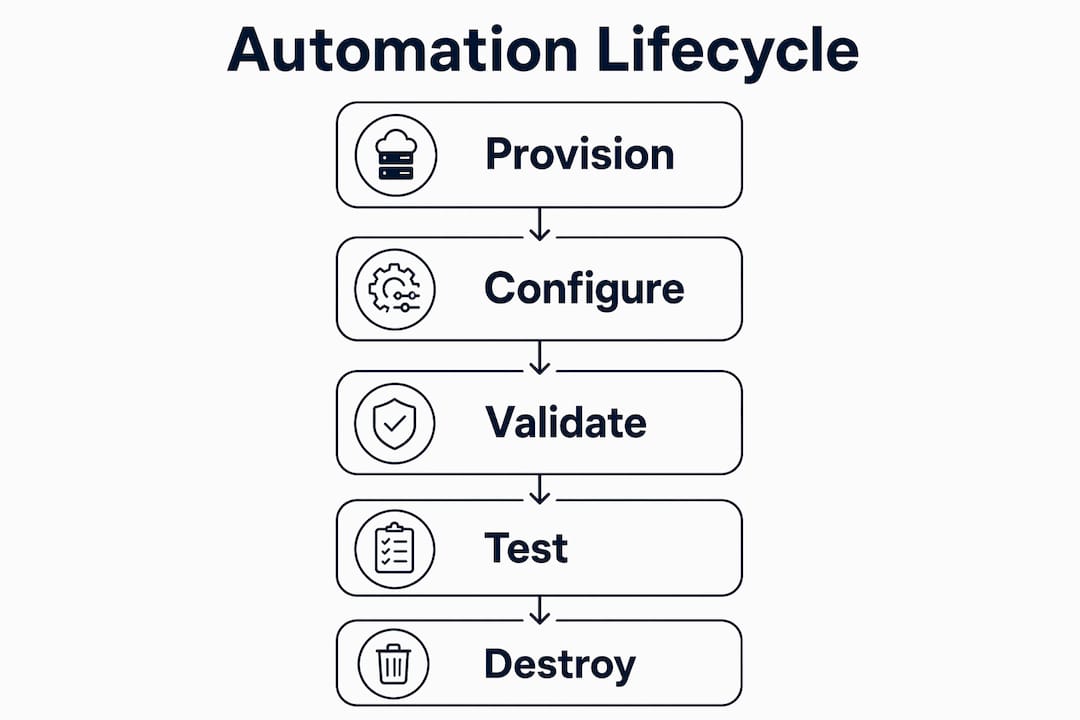
| Provisioning and teardown | Script full lifecycle: provision, deploy, validate, test, and destroy |
| Dependency documentation | List all integrations and define mock or virtualization strategy for each |
| Monitoring and logging | Enable log aggregation and alerting to support failure diagnostics |
Key components in successful automation include defining clear infrastructure requirements, database seeding and masking strategies, and production parity focused on critical components to control cost and complexity. Teams that skip the ownership and naming conventions step consistently end up with orphaned cloud resources and unexplained cost spikes.
Test environment stability is the prerequisite for trustworthy automated test results and faster debugging. Monitoring and logging are not optional additions. They are the feedback mechanism that tells your team whether an environment is healthy before tests run and why a test failed after the fact.
For teams using Jira, connecting your environment automation to your test case management in Jira workflow closes the loop between environment state and test execution records.
Key Takeaways
Test environment automation succeeds when teams treat environments as version-controlled, ephemeral assets in the CI/CD pipeline, not as static infrastructure managed by hand.
| Point | Details |
|---|---|
| Automate the full lifecycle | Provision, deploy, validate, test, and destroy environments through scripted pipelines, not manual steps. |
| Standardize before automating | Document and stabilize environment management processes first; automation amplifies chaos if processes are broken. |
| Use ephemeral environments | On-demand, short-lived environments eliminate drift and enable parallel testing across feature branches. |
| Apply production parity selectively | Mirror production for critical integrations and schema only; use mocks for unstable third-party dependencies. |
| Integrate monitoring from day one | Log aggregation and health checks are prerequisites for diagnosing failures in automated environments. |
The shift I keep watching in environment automation
The teams I see succeeding in 2026 are not the ones with the most sophisticated tooling. They are the ones that made a deliberate decision to treat their test environments the same way they treat application code: versioned, reviewed, and owned.
The most underrated shift is the move toward environment intelligence, which goes beyond simple scheduling to surface dependency conflicts early in enterprise pipelines. Most teams still think of environment management as a logistics problem. The teams that are pulling ahead treat it as a strategic control plane.
The cost conversation is also changing. Teams used to justify ephemeral environments purely on speed. Now the conversation includes cloud cost governance, because automated teardown and right-sized environments are measurably cheaper than the static staging servers that sit idle 70% of the time.
My honest advice: do not wait until your CI/CD pipeline is mature to start automating your environments. Start with one environment, one pipeline, and one team. The governance habits you build early prevent the technical debt that kills automation programs at scale. Pair your environment automation work with a solid automated regression testing strategy and the two reinforce each other directly.
— STF
Deepen your test automation knowledge with Software Testing Front
Software Testing Front publishes practical guides built specifically for QA professionals and developers working in agile and DevOps environments. If you are building out your automation strategy, the right test management tooling is what connects your environment setup to your test execution and reporting.

The 2026 test management tools guide on Software Testing Front covers the full range of options, from Jira-native tools like Vansah Test Management for Jira and Xray Test Management for Jira to broader platforms. You will also find deep-dive tutorials on Jira QA integration that show exactly how to connect your automated environments to your test case workflows. Software Testing Front is the resource QA teams return to when they need answers grounded in real practice.
FAQ
What is test environment automation?
Test environment automation is the code-driven process of provisioning, configuring, and tearing down test environments automatically using tools like Terraform, Ansible, Docker, and Kubernetes. It replaces manual setup with scripted, version-controlled infrastructure that runs inside CI/CD pipelines.
What is environment drift and why does it matter?
Environment drift occurs when a test environment diverges from its intended configuration due to manual changes or inconsistent setup. It is a leading cause of non-reproducible bugs, where tests pass in one environment and fail in another for reasons unrelated to the code.
What are ephemeral environments?
Ephemeral environments are temporary, isolated application instances created for a specific test run and destroyed after use. They can last as little as the duration of a single CI pipeline, typically minutes, and eliminate drift by starting every test from a clean, version-controlled state.
How does Infrastructure as Code support test environment setup?
Infrastructure as Code tools like Terraform define cloud resources in configuration files stored in version control. This means every test environment is provisioned from the same definition, making setups reproducible, auditable, and consistent across teams.
When should teams use service virtualization instead of real environments?
Teams should use service virtualization and mocks for unstable or unavailable third-party dependencies, reserving full production-like environments for critical regression and performance testing. This approach reduces cost while maintaining sufficient test coverage for most test cases.
Recommended
- Why Automate Regression Tests: A 2026 QA Guide – Software Testing Front
- Integration Testing Setup Guide for QA Teams in 2026 – Software Testing Front
- Test Case Management Best Practices: 2026 QA Guide – Software Testing Front
- Types of Test Management Tools: Your 2026 QA Guide – Software Testing Front


