
Production Testing Explained: A 2026 Guide for QA Teams

What is production testing and why does it matter?
Production testing, also called Testing in Production (TiP), is the practice of validating software directly in the live environment using real user traffic, real data, and real infrastructure conditions. Your CI pipeline can be green, your staging environment can pass every check, and a bug can still break checkout for a meaningful slice of your users the moment real database load and genuine session data enter the picture. That scenario is not an edge case.
The core argument for production testing is straightforward: staging environments lie. They run on subsets of data, simulate traffic rather than serve it, and cannot replicate the unpredictable behavior of real users on outdated browsers, spotty mobile connections, or unusual device configurations. Testing in production provides the full scope of the production environment, the real workload of customer traffic, and profiles that evolve as production demand changes over time.
Production testing is not a replacement for your existing test suite. It is an additional validation layer that catches what pre-production environments structurally cannot reach. Think of it as the final verification pass after your unit tests, integration tests, and staging checks have already done their job.
Key reasons teams adopt production testing:
- Real edge cases. Unusual account states, legacy data formats, and unpredictable user paths exist only in production.
- Third-party service behavior. External APIs, payment gateways, and downstream microservices behave differently under real traffic. Rate limits and latency patterns you will never see in staging appear immediately.
- Infrastructure drift. Even when your application does not change, the infrastructure it relies on does. Production testing validates the health of a constantly evolving environment.
- Microservices compatibility. Different versions and configurations reach production in many ways. Pre-production test coverage cannot guarantee compatibility across all of them.
- Shift-right alignment. Production testing is the “shift right” counterpart to shift-left practices, moving some validation later in the DevOps pipeline to capture what earlier stages miss.
Elite engineering teams deploy 182 times more frequently than low performers by combining mature production testing with strong observability. That figure from DORA research tells you something concrete: deployment velocity and production quality are not in conflict when the right guardrails are in place.
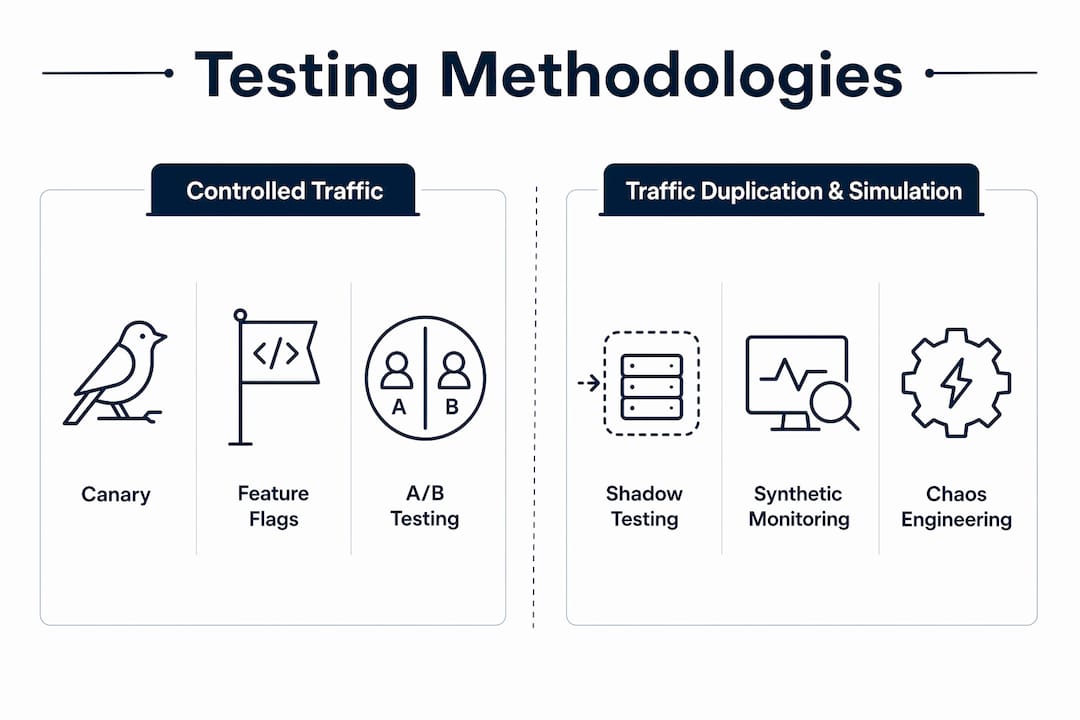
Primary methodologies for conducting production testing effectively
Production testing is not a single technique. It is a toolkit of controlled methods, each designed to expose a different class of real-world failure while limiting the blast radius if something goes wrong.
Canary releases
A canary release routes a controlled percentage of production traffic, typically 1% to 5%, to the new version of your service. The canary cohort’s error rates, latency, and business metrics are compared against the control cohort in real time. If the canary shows degradation, it rolls back before the full user base is affected. Implementation requires traffic routing infrastructure (a load balancer or service mesh), real-time dashboards showing canary versus control comparison, and automated rollback triggers based on error rate thresholds.

Feature flags
Feature flags let you ship code that is switched off. You activate it for specific users, segments, or traffic percentages without touching your deployment. A new checkout flow can be enabled for internal employees first, then for a small segment of users, then for a regional subset, all controlled by a configuration change rather than a code deploy. Feature flags enable instant rollback by toggling features off without redeployment, which is the most practical safety mechanism available in production testing.
A/B testing
A/B testing runs two versions of a feature simultaneously across different user segments to determine which performs better. Conversion rates, session depth, and click-through behavior cannot be replicated in staging with any statistical validity. You need real users, real intent, and real context.
Shadow testing (traffic mirroring)
Shadow testing duplicates live production traffic and routes a copy to a new service version running in parallel. That shadow service processes requests and generates outputs, but users never see any of it. Shadowing production traffic to a separate environment bridges the gap between staging limitations and production realities, enabling thorough validation without user-facing risk.
Synthetic monitoring
Synthetic monitoring executes scripted user journeys against production systems on a scheduled basis, independent of real user traffic. A checkout flow breaking at 2 AM is detected by the synthetic monitor at 2:01 AM and resolved before business hours. Without it, the failure surfaces when the first customer calls support.

Chaos engineering
Chaos engineering deliberately introduces failures into production systems to verify that resilience mechanisms hold up. Netflix originated the practice and formalized it into the Principles of Chaos Engineering. The core tool, Chaos Monkey, randomly terminates production instances to verify that the system continues operating and self-heals without human intervention. This is an advanced technique that requires resilience architecture to be in place before it can be practiced safely.
Smoke testing in production
After every deployment, smoke tests run lightweight automated checks to confirm that core functionality is intact. Does the app load? Can users log in? Does the primary user flow complete without errors? These checks are fast, low-risk, and catch obvious misconfigurations before they reach any customers.
Pro Tip: Start every canary at 1% and watch error rates and latency for at least 15 minutes before expanding. The blast radius stays small, and you have time to react before the majority of users are ever affected.
Key benefits of implementing production testing
The case for production testing goes beyond catching bugs. It changes how your team ships software.
Deployment frequency increases. DORA research documents that elite teams deploy 182 times more frequently than low performers by relying on production testing practices to maintain quality at that velocity. When you can test safely in production, you make smaller, incremental changes instead of large releases that are harder to debug and riskier to roll back.
Feedback loops compress dramatically. Instead of waiting weeks to learn whether users actually engage with a feature, you get real behavioral data within hours of a canary or A/B test launch. That speed changes how your team prioritizes fixes and iterations.
Production testing also surfaces edge cases that no pre-production environment can anticipate. Real users do unexpected things: they use outdated browsers, incomplete form data, and unusual account configurations that no QA script covers. Those scenarios only appear under genuine load with genuine user intent.
Additional benefits worth noting:
- Cost reduction. Maintaining expensive staging environments that mirror production infrastructure is resource-intensive. Production testing with proper safeguards reduces that dependency.
- Improved user experience. Real-time observability during production tests gives your team direct insight into how changes affect actual user journeys, not simulated ones.
- Faster incident response. Teams that test in production build stronger monitoring and alerting as a prerequisite, which accelerates detection and recovery across all incidents, not just test-related ones.
What are the risks in production testing and how do you mitigate them?
Production testing carries real risks. Understanding them is the first step toward controlling them.
The most direct risk is user impact. When something goes wrong during a production test, real users experience it. Data integrity is a close second: working with real customer data means a misconfigured test can corrupt or expose information that matters. Performance degradation is a third concern, particularly when load or stress tests run during peak traffic windows.
Common pitfalls that amplify these risks:
- Insufficient monitoring before testing begins, leaving your team blind to degradation signals.
- Uncontrolled rollouts that expose too large a user segment too quickly.
- No documented rollback criteria, forcing panicked manual decisions under pressure.
- Treating production as a substitute for pre-production testing rather than a complement to it.
- Flag proliferation: organizations with hundreds of active feature flags accumulate testing debt as old flags are never cleaned up.
Mitigation strategies that actually work:
- Blast radius control. Canary releases and feature flags limit impact to a small user segment, enabling innovation without compromising overall system stability.
- Real-time monitoring. Application performance monitoring (APM) tools like New Relic and Datadog provide performance insights during tests. Real User Monitoring (RUM) tools such as Raygun and LogRocket give direct visibility into user experience.
- Automated rollback. Define the exact conditions that trigger a rollback before you deploy. For canary and blue-green deployments, under five minutes is a reasonable target.
- Data protection. Anonymize where possible, restrict test traffic to opted-in beta users where feasible, and stay compliant with GDPR and CCPA.
Pro Tip: Start with low-risk, non-critical features or internal tools before testing anything customer-facing. Build confidence in your monitoring and rollback procedures before expanding scope.
How production testing fits alongside traditional QA
Production testing and pre-production testing are not competing approaches. They address different failure modes, and the highest-reliability organizations run both.
Pre-production testing (unit tests, integration tests, staging) validates correctness in controlled environments. It catches logic bugs, type errors, and integration failures before code reaches users. Production testing validates behavior under real traffic, genuine user patterns, and infrastructure conditions that staging cannot replicate. Martin Fowler’s framework on QA in production makes this distinction precise: pre-production testing validates correctness; production testing validates behavior.
The sequence matters. Pre-production testing runs first and catches the majority of defects early, when they are cheapest to fix. Production testing then serves as the final verification layer for what slips through. Skipping pre-production in favor of production testing is an anti-pattern: it misses the point that proper QA requires a variety of practices, of which production testing is just one.
| Aspect | Pre-production testing | Production testing |
|---|---|---|
| Environment | Dev, staging, QA | Live production |
| Data | Mocked or anonymized | Real user data |
| Traffic | Simulated load | Actual user traffic |
| Edge cases | Anticipated scenarios | Unanticipated real-world behavior |
| Risk level | Low | Medium (manageable with guardrails) |
| Best for | Logic bugs, unit failures | Performance, UX, integration behavior |
The Facebook development team, for example, accepts a higher tolerance for production issues because they have strong feedback loops and can release fixes quickly. A company building medical devices sits at the opposite end: high stakes and a slow feedback loop demand thorough pre-production coverage. Most systems fall somewhere between those extremes, and finding the right balance is a team-specific decision. For a deeper look at foundational test concepts, Software Testing Front covers the full spectrum of testing stages and their relationships.
Best practices and guardrails for safe production testing
Safe production testing does not happen by accident. It requires deliberate architecture decisions, process discipline, and team alignment before a single test runs.
Establish observability first. Logging, distributed tracing, and alerting need to be in place before you run any production test. Google’s SRE Book defines three required observability layers: logging (queryable structured records of system events), metrics (quantitative measurements over time), and tracing (correlated request flows across service boundaries). All three are required. Any one in isolation is insufficient.
Build testability into your architecture. Building testability into system architecture using fine-grained feature flags, observability, and traffic shadowing is critical for effective production testing at scale. This is not something you retrofit easily. Design for it from the start.
Core guardrails every team should implement:
- Separate deployment from release. Ship the code; do not turn it on yet. This practice sounds overly cautious until the first time it prevents a production incident at 2 AM.
- Document rollback criteria before deploying. Define the exact conditions that trigger a rollback and how long it should take. Rollbacks should be boring, not heroic.
- Use feature flags from day one. Toggling should be built into your deployment workflow, not added after something breaks.
- Communicate across teams. Everyone involved needs to know when a production test is running, what metrics to watch, and who owns the rollback decision.
- Automate fault injection experiments. Chaos engineering tests are expensive and must run on ever-changing systems. Automation keeps them consistent.
Pro Tip: Integrate testability into your system architecture at the design stage. Feature flag support, distributed tracing hooks, and traffic mirroring capability are far easier to build in than to bolt on later.
Avoiding common test management pitfalls is equally important here. Poor traceability and unclear ownership of test results in production can turn a controlled experiment into an unmanaged incident.
How do you measure the success of a production test?
Measuring production test outcomes requires specific metrics, not general impressions. The right metrics tell you whether a canary is safe to expand, whether a feature flag should stay on, and whether a deployment has degraded system health.
Core metrics to track:
| Metric | What it tells you |
|---|---|
| Change failure rate | Percentage of deployments that cause a production incident |
| Mean time to recovery (MTTR) | How fast you recover when something breaks |
| Error rate | A spike after deployment is a rollback signal |
| Latency | Performance degradation from new code |
| Conversion rate (for A/B tests) | Which variant drives better user behavior |
| Canary vs. baseline comparison | Direct difference between new and old version metrics |
Real-time dashboards are not optional. Your monitoring must detect problems within minutes, not hours. During a canary rollout, you are actively deciding whether to continue, pause, or roll back. That decision requires live data, not a post-hoc report.
Monitoring layers including logging, metrics, and tracing are the observability components required to diagnose production test anomalies and ensure system resilience. Synthetic monitoring adds a proactive layer: it detects availability and correctness problems independently of real user traffic, so failures are caught before customers encounter them.
Production telemetry also feeds a continuous improvement loop. Every anomaly detected in production is data about real system behavior under real conditions. Teams that treat production as a learning environment with strong monitoring and rapid fix capacity build more resilient systems over time. For teams looking to go deeper on performance metrics, the performance testing guide at Software Testing Front covers code-level measurement techniques that complement production observability.
Expert insights and recent industry research on production testing
The research on production testing converges on a few consistent principles that separate teams who do it well from teams who create incidents.
DORA’s findings are the most cited benchmark in this space. Elite engineering teams deploy 182 times more frequently than low performers, and they maintain that velocity by combining thorough pre-production testing with mature production observability and guardrails. Deployment frequency and quality are not in tension when the architecture supports controlled blast radius.
Martin Fowler’s writing on QA in production frames the practice as treating production as a learning environment. Tests can only help you with scenarios you already know about. Many production defects are surprises: users, networks, browsers, and devices are diverse and unpredictable in ways that no test script anticipates. Good production monitoring provides feedback about scenarios you had not foreseen and helps you adjust system behavior accordingly.
The Microsoft Azure DevOps documentation on shift-right testing reinforces that releasing to production is only half of delivering software. The other half is ensuring quality at scale with a real workload. Because the environment keeps changing, a team is never done with testing in production.
The most resilient systems are built by accepting that unexpected defects will occur and focusing on rapid detection and remediation rather than attempting to prevent every possible failure before release. Blast radius control is the mechanism that makes this philosophy safe in practice: limiting user impact through staged rollouts enables teams to innovate without compromising overall system stability.
Key Takeaways
Production testing validates real-world software behavior that staging cannot replicate, and it requires feature flags, canary releases, observability, and documented rollback plans to be safe.
| Point | Details |
|---|---|
| Production testing complements QA | It catches what pre-production misses; it does not replace unit, integration, or staging tests. |
| Canary releases limit blast radius | Routing 1% to 5% of traffic to a new version lets you detect degradation before most users are affected. |
| Observability must come first | Logging, metrics, and tracing must be in place before any production test runs. |
| Feature flags enable instant rollback | Toggling a feature off without redeployment is the fastest and safest recovery mechanism available. |
| Elite teams deploy far more often | DORA research shows elite teams deploy 182 times more frequently than low performers using production testing practices. |
FAQ
What is production testing?
Production testing is the practice of running validation activities against a live production environment after deployment, using real user traffic and data to surface issues that controlled pre-production environments cannot replicate.
What testing is done in production?
Common production testing methods include canary releases, feature flag rollouts, A/B testing, shadow traffic mirroring, synthetic monitoring, smoke testing after deployment, and chaos engineering for resilience validation.
How does production testing differ from staging testing?
Staging uses a controlled replica of production with limited, often anonymized data. Production testing uses the live environment with real users and real traffic. Staging catches logic bugs early; production validates real-world behavior that staging cannot replicate.
Is testing in production safe?
It is safe with proper blast radius controls: canary releases that limit affected traffic, feature flags with instant rollback capability, and observability tooling that surfaces anomalies within minutes. Without those controls, it carries meaningful risk to users and data integrity.
Where does production testing fit in the overall QA process?
Production testing is the final verification layer. Pre-production testing (unit, integration, staging) runs first and catches the majority of defects. Production testing then validates behavior under real conditions that no controlled environment can fully replicate. The test management tools guide at Software Testing Front covers how to manage both stages within a unified QA workflow.
Recommended
- Performance Testing Automation: A 2026 QA Guide – Software Testing Front
- What Is End-to-End Testing? A 2026 QA Guide – Software Testing Front
- What Is Contract Testing? A 2026 Guide for QA Teams – Software Testing Front
- What Is Unit Testing? A 2026 Guide for Dev Teams – Software Testing Front


