
Jira Test Management Explained for QA Teams in 2026

TL;DR:
- Jira test management involves organizing and tracking tests through specialized add-ons within Jira. Native Jira lacks essential features such as test repositories and step-level tracking, requiring external tools or apps. Effective workflows and native apps like Vansah enable reliable traceability, compliance, and faster bug resolution in Agile environments.
Jira test management is defined as the practice of organizing, executing, and tracking software tests inside Jira using purpose-built workflows and specialized add-ons. Native Jira provides no test case repository, no execution cycles, and no step-level pass/fail tracking. To run a structured testing process that meets standards like ISO/IEC/IEEE 29119, your team needs either a Jira Marketplace app or an external platform integrated via API. This article covers the core limitations, the two main patterns QA teams use, and the workflow practices that separate teams with confident release sign-off from those guessing at quality.
What is Jira test management, and why does it matter?
Jira test management is the structured approach to planning, executing, and reporting on software tests within the Jira ecosystem. The term is widely used in QA communities, but the recognized industry concept is test management, defined formally in ISO/IEC/IEEE 29119 as the planning, monitoring, and control of testing activities across a project lifecycle. Understanding both terms matters because Jira itself is a project tracking tool, not a test management platform.

The gap between those two things is where most QA teams run into trouble. Your team may track bugs in Jira perfectly well, but test case management in Jira requires a deliberate setup that goes far beyond default issue types. Requirement-to-test traceability, execution history, and reusable test cycles are not built into Jira’s core product. Without them, your team cannot answer a basic audit question: what was tested before this release shipped?
What are the limitations of Jira’s native test management capabilities?
Jira lacks native test management features such as test case repositories, execution cycles, or requirement traceability. That is not a minor gap. It means every structured testing activity your team needs requires a workaround, a custom issue type, or an external tool.
The most common workaround is using Jira subtasks or epics to represent test cases. This approach creates real problems fast:
- No versioning. Jira issues do not support test case versions, so you cannot track how a test changed between releases.
- No execution history. A Jira issue has a status, not a log of every time it was run, by whom, and with what result.
- No step-level execution. You cannot record pass/fail at the individual step level inside a standard Jira issue.
- No test sets or cycles. Grouping tests into a repeatable execution cycle requires manual workarounds that break down at scale.
Custom Jira issue types often fail because Jira issues lack the primitives needed for test logic. Teams end up with orphaned issues, inconsistent naming, and no reliable execution history. That is technical debt, not a testing process.
Most teams attempt native test management with subtasks or epics, and the result is clutter rather than clarity. The board fills with test-related issues that have no relationship to actual test results, and managers cannot tell what passed, what failed, or what was never run.
Pro Tip: If your team is currently using Jira subtasks as test cases, audit how many have been updated in the last sprint. Stale subtasks with no execution data are a clear sign your process has already broken down.
What are the main approaches to managing tests within Jira ecosystems?
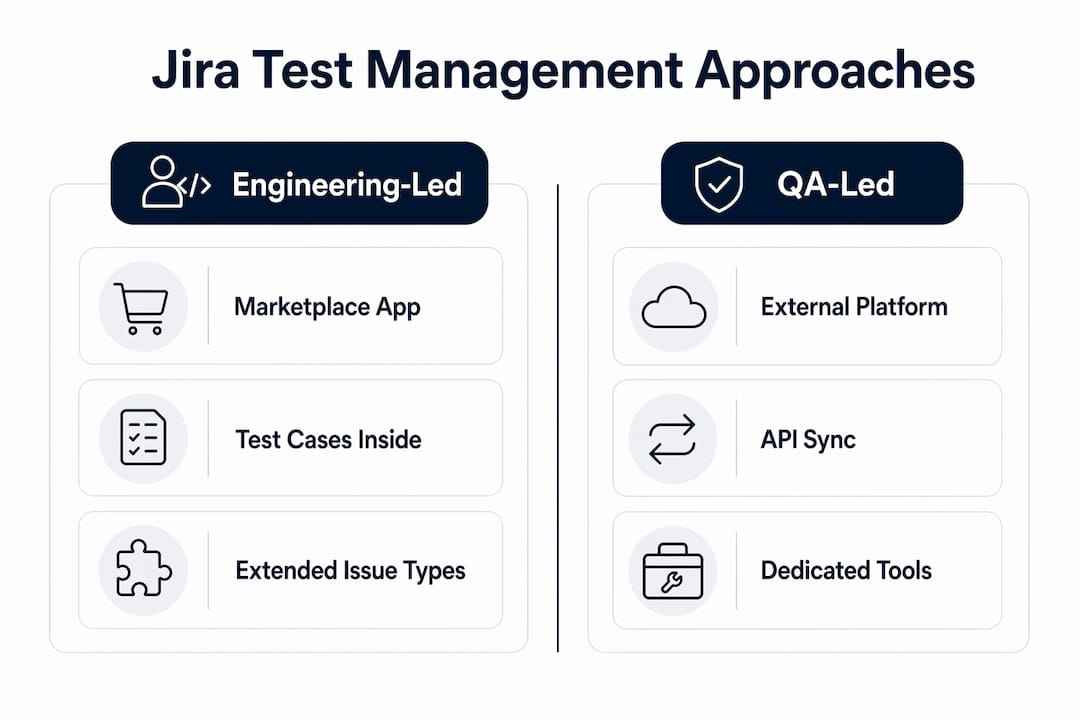
Two main Jira test management patterns exist: engineering-led using Jira Marketplace apps, and QA-led using external dedicated platforms synced to Jira via API. Each pattern fits a different team structure and testing maturity level.
| Feature category | Marketplace app (native) | External dedicated platform |
|---|---|---|
| Test case storage | Inside Jira as native issue types | Outside Jira in a separate database |
| Requirement linking | Direct Jira issue links | API sync, may have sync lag |
| Execution tracking | Native, real-time | Separate workspace, manual or automated sync |
| Audit trail | Immutable Jira records | Platform-specific logs |
| Context switching | Low (everything in Jira) | High (two tools, two UIs) |
| Advanced QA features | Moderate to high (app-dependent) | High (purpose-built) |
The engineering-led pattern uses Jira Marketplace apps that store test cases as Jira issue types with extended fields. Tools like Vansah Test Management for Jira follow this pattern. Your team writes, executes, and reports on tests without leaving Jira. Requirements, test cases, and defects all live in the same project, linked by standard Jira relationships.
The QA-led pattern uses a standalone test management platform that syncs with Jira via API. This gives QA teams a purpose-built workspace with advanced features, but it introduces context switching. Testers work in one tool, developers work in another, and keeping both in sync adds overhead.
Pro Tip: Choose a Marketplace app that stores test data natively inside Jira’s own database, not in an external database accessed through the app. Native storage means your test evidence survives even if you change tools.
How to design effective QA workflows and traceability within Jira
Structured QA workflows with explicit testing states improve communication and reduce delays in bug fixing cycles. The default Jira workflow states (To Do, In Progress, Done) are not enough for a testing process. Your team needs states that reflect the actual QA lifecycle.
A practical workflow for QA-managed stories looks like this:
- Ready for QA. The developer marks the issue ready. This triggers a notification to the assigned tester.
- In Testing. The tester picks up the issue and begins executing linked test cases.
- QA Failed. The tester logs a defect, links it to the story, and returns the issue to the developer. An automation rule reassigns the issue automatically.
- QA Passed. All linked test cases have passed. The issue moves to the release queue.
- Released. The story ships. Execution records remain linked for audit purposes.
Custom workflows enabling automatic reassignment on QA Failed reduce bug triage time significantly. That matters in sprint-based teams where a single day of triage delay can push a fix to the next sprint.
Traceability is the second critical design decision. A stable, queryable link between requirements and test cases is the foundation of reliable quality metrics and compliance. In Jira, this means linking test cases to user stories using Jira’s native issue link types, then using JQL to query coverage. A query like issueType = "Test Case" AND "Linked Issue" = PROJ-101 should return every test written for a specific requirement.
Ignoring full traceability leads to a lack of a single source of truth for tested releases. Teams that cannot answer “what was tested for release X” in one query have a traceability problem, not a testing problem.
Pro Tip: Build a Jira dashboard with a JQL filter showing all stories in the current sprint that have zero linked test cases. Review it at sprint planning. Untested stories are your biggest release risk.
What advanced features do marketplace test management apps like Vansah provide?
Native Jira Marketplace apps solve the core gaps that raw Jira cannot address. Native apps like Vansah embed test management fully inside Jira, enabling audit-friendly immutable records and CI/CD integration. That combination is particularly valuable for regulated industries where test evidence must be traceable, timestamped, and tamper-proof.
The features that matter most for QA teams include:
- Structured test case repositories. Test cases are stored as first-class Jira issue types with dedicated fields for preconditions, steps, expected results, and test data.
- Step-level execution tracking. Each test step gets its own pass/fail status during a test run, not just the overall test case.
- Version control for test cases. When a test changes, the previous version is preserved. You can compare what was tested in sprint 12 versus sprint 15.
- Execution cycles. Group test cases into a named cycle (e.g., “Regression Sprint 22”) and track overall progress as a percentage.
- CI/CD pipeline integration. Automated test results from tools like Jenkins or GitHub Actions post directly into Jira test runs, keeping manual and automated results in one place.
- Reporting dashboards. Coverage reports, defect density by component, and execution progress are visible inside Jira without exporting to a spreadsheet.
For regulated industries, native tools are superior because immutable Jira-linked test evidence simplifies audits. Execution time, tester identity, and pass/fail status are stored as Jira records that cannot be edited after the fact. Vansah’s approach to native Jira integration follows this model directly.
How to optimize Jira test management for Agile teams’ iterative cycles
Agile teams face a specific challenge: testing must keep pace with sprint velocity without sacrificing coverage. The answer is not running all tests every sprint. The answer is knowing exactly which tests to run, and reusing them reliably.
For Agile teams, reuse of test cases across sprints and clear coverage metrics outperform simple pass/fail counts for release readiness. A test case written for a login feature in sprint 3 should be part of your regression cycle in every subsequent sprint, without being rewritten. Marketplace apps with execution cycles make this straightforward.
Key practices for Agile test management in Jira:
- Define quality gates, not just pass rates. A 95% pass rate means nothing if the 5% failures cover your payment flow. Set gates by risk area, not raw numbers.
- Use JQL to monitor real-time risk. Filters like
issueType = "Test Run" AND status = "Failed" AND sprint in openSprints()surface active failures before the sprint review. - Track coverage, not just execution. A story with 10 test cases executed is not the same as a story with 10 test cases written but never run. Your dashboard should show the difference.
- Automate regression, report manually. Use CI/CD integration to run regression suites automatically on each build. Reserve manual testing time for exploratory and new-feature coverage.
Excessive context switching undermines QA workflow efficiency. Jira-native tools that integrate requirements, tests, and defects reduce this hidden cost. When your tester can see the requirement, the test case, and the linked defect in one Jira screen, triage time drops and defect quality improves.
Native apps reduce context switching, improving tester productivity and defect handling visibility. That is not a minor convenience. It is the difference between a QA process that scales with your team and one that breaks under sprint pressure.
Key takeaways
Effective Jira test management requires purpose-built tools and structured workflows, not workarounds built from native Jira issue types.
| Point | Details |
|---|---|
| Native Jira is not enough | Jira has no test case repository, execution cycles, or step-level tracking out of the box. |
| Two patterns exist | Engineering-led (Marketplace apps) and QA-led (external platforms) serve different team needs. |
| Traceability is non-negotiable | Linking requirements to test cases via JQL is the only way to answer “what was tested” at release. |
| Custom workflows reduce delays | States like QA Failed with auto-reassignment cut bug triage time inside sprint cycles. |
| Native apps win on audit trails | Marketplace apps like Vansah store immutable execution records directly in Jira for compliance. |
What I’ve learned from watching QA teams struggle with Jira
The most common mistake I see is teams treating Jira as a test management tool the moment they start tracking bugs in it. That logic feels reasonable. Jira is already open, everyone uses it, and creating a new issue type takes five minutes. The problem shows up three months later when no one can tell you what was tested before the last release.
The second mistake is choosing a tool based on feature lists rather than integration depth. A Marketplace app with 40 features that stores data natively inside Jira will serve your team better than an external platform with 80 features that requires a daily sync job. The sync job breaks. The native storage does not.
My honest recommendation for most Agile teams in 2026 is to start with a native Jira Marketplace app. The right test management solution depends on your team size, compliance requirements, and sprint velocity. But native integration removes a category of problems before they start. Vansah is a strong example of this pattern done well, and Software Testing Front covers it in depth for teams that want a detailed comparison before committing.
The teams that get this right share one trait: they treat test management as a first-class engineering concern, not an afterthought. They design their Jira workflows before they write their first test case. That discipline is what separates teams that ship with confidence from teams that ship and hope.
— STF
Resources from Software Testing Front for your Jira testing process
Software Testing Front publishes practical guides, tool comparisons, and workflow tutorials built specifically for QA professionals working inside Jira environments.

If your team is evaluating which approach fits your workflow, the 2026 QA tool guide on Software Testing Front breaks down every major tool category with clear criteria for selection. For teams ready to go deeper on native Jira apps, the top Jira testing tools overview covers the leading Marketplace options including Vansah, with feature-level detail that saves hours of evaluation time. Both resources are free and updated for 2026.
FAQ
What is Jira test management?
Jira test management is the practice of planning, executing, and tracking software tests within Jira using specialized Marketplace apps or external platforms integrated via API. Native Jira does not support structured test management without additional tooling.
Does Jira have built-in test case management?
Jira has no native test case repository, execution cycles, or step-level tracking. Teams must use a Jira Marketplace app or an external platform to manage test cases effectively.
What is the difference between a Marketplace app and an external test platform?
Marketplace apps store test data natively inside Jira, keeping requirements, tests, and defects in one environment. External platforms provide a separate QA workspace synced to Jira via API, which introduces context switching and sync dependencies.
Why is traceability critical in Jira test management?
Traceability links requirements directly to test cases and execution results, making it possible to answer “what was tested for this release” with a single JQL query. Without it, release sign-off is based on assumption rather than evidence.
What makes Vansah a strong choice for Jira test management?
Vansah stores test cases, execution records, and results natively inside Jira, supports CI/CD pipeline integration, and produces immutable audit-ready records. That combination suits both Agile teams and organizations with compliance requirements.
Recommended
- Jira Test Management Tools Comparison: Xray vs Zephyr vs Vansah vs QMetry (2025 Edition) – Software Testing Front
- Software Testing Front – Testing Resources along with popular Jira Testing Apps
- Insights – Software Testing Front
- Unleashing the Power of Jira: Top 5 Testing Tools for Seamless QA Integration – Software Testing Front


