
Automated Accessibility Testing Explained for QA Teams

TL;DR:
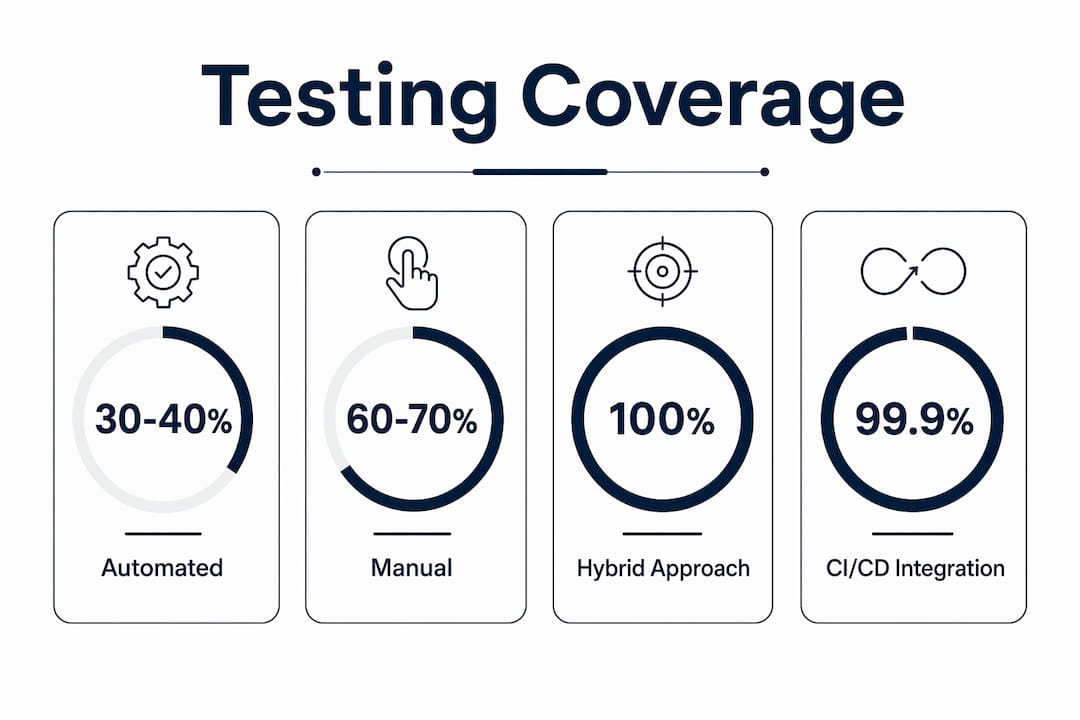
- Automated accessibility testing detects about 30 to 40 percent of WCAG violations through code analysis. Manual testing is necessary to identify complex, context-dependent issues that automation cannot address. Combining both approaches ensures a comprehensive and effective accessibility strategy.
Automated accessibility testing is defined as the use of software tools to scan digital products for code-level accessibility violations against standards like WCAG 2.1 and EN 301 549. These tools catch roughly 30–40% of WCAG violations automatically, making them a fast and repeatable first line of defense for QA teams. The remaining 60–70% of violations require manual testing by human evaluators using screen readers and expert judgment. For QA professionals, developers, and project managers building inclusive software, understanding where automation helps and where it falls short is the foundation of a sound accessibility strategy.
What is automated accessibility testing and what can it actually detect?
Automated accessibility testing uses rule-based engines to scan HTML, CSS, and JavaScript for specific, measurable violations. Tools like axe-core and Lighthouse apply deterministic checks: they look for patterns in code that definitively break a WCAG rule. This makes them fast, consistent, and easy to run at scale across large codebases.
The issues these tools catch reliably include:
- Missing alt text on images (though not whether the alt text is meaningful)
- Low color contrast ratios that fail WCAG 2.1 AA thresholds
- Missing form labels that leave inputs unlabeled for screen readers
- Invalid ARIA roles or attributes that break assistive technology parsing
- Missing document language declarations and page title elements
What automation cannot catch is equally important. Context-dependent issues like whether alt text accurately describes an image, whether keyboard navigation flows logically through a page, or whether a screen reader announces interactive elements in a coherent order all require human judgment. Complex ARIA-driven widgets, modal dialogs, and dynamic content updates fall into the same category.
A zero-error automated scan often creates a false sense of security. It only confirms the absence of detectable code-level errors. It says nothing about whether a real user relying on a screen reader can actually complete a task on your site.

Pro Tip: Treat automated scans exactly like a spell-checker. They catch obvious, rule-based errors fast. Manual testing is the copy-editing pass that catches meaning, flow, and context. You need both.
How to integrate accessibility checks into your CI/CD pipeline
Embedding accessibility testing into your CI/CD pipeline is the most effective way to prevent violations from accumulating. The shift-left principle applies directly here: catching an accessibility error at the pull request stage costs a fraction of what it costs to fix after release.
A practical integration follows this sequence:
- Add axe-core or Lighthouse CI to your build pipeline. Both tools have CLI versions and GitHub Actions integrations that run on every commit or pull request without manual intervention.
- Configure a “fail-fast” rule for critical violations only. Start with high-impact, low-noise rules: color contrast, missing labels, and invalid ARIA roles. Failing builds on every minor warning creates developer fatigue fast.
- Set a baseline and track regressions. Run your first scan to establish a current violation count. Configure the pipeline to fail only when new violations appear, not pre-existing ones. This prevents the team from being blocked by legacy debt while still catching new problems.
- Expand the ruleset gradually as the team matures. Gradual ruleset expansion improves adoption and reduces pushback. Teams that start narrow and expand over sprints build accessibility habits without feeling overwhelmed.
- Pair automated scans with manual spot checks on every release. Automated checks run continuously; manual audits run on a defined schedule, typically before major releases or after significant UI changes.
The most common pitfall in CI/CD integration is treating a passing automated scan as a sign-off on accessibility. Hybrid testing remains the recommended strategy because automation and manual testing cover fundamentally different problem sets.
Pro Tip: When you first add accessibility checks to a pipeline, use a “warn” mode rather than “fail” for the first two sprints. This gives your team time to understand the output without blocking deployments, and it builds buy-in before enforcement.
Understanding why test automation fails in broader QA contexts applies directly to accessibility automation. Overly broad rulesets, unclear ownership, and no defined remediation process are the same failure patterns.
What business benefits come from accessibility testing?
The financial case for accessibility testing is direct. ADA Title III lawsuits cost companies $25,000 to $75,000 per case before legal fees. Early integration of accessibility testing eliminates most of the code-level violations that trigger these claims before they reach production.
The ROI extends well beyond legal risk. Documented outcomes from accessibility improvements include:
- A retail client that increased conversions by 16% after remediating accessibility barriers in their checkout flow
- A SaaS company that reduced support tickets by 31%, saving $180,000 annually, by making their UI navigable without a mouse
- Captions on video content boosting completion rates by 35–50%
- Simplified mobile forms increasing conversions by 12–18%
Forrester research puts the return at $100 for every $1 invested in accessibility. That figure reflects both direct revenue gains and cost avoidance across support, legal, and rework.
Accessibility compliance is not the same as accessibility quality. A site can pass every automated scan and still frustrate a user relying on a screen reader. Meaningful accessibility requires testing beyond code-level verification. Compliance is the floor, not the ceiling.
The curb-cut effect illustrates why accessibility improvements benefit your entire user base, not just users with disabilities. Captions help users in noisy environments. High-contrast text helps users in bright sunlight. Keyboard navigation helps power users who prefer not to use a mouse. Features built for accessibility routinely improve the experience for everyone.
What are the current challenges in automated accessibility testing?
Traditional rule-based accessibility tools operate on deterministic logic. They check whether a specific attribute exists or whether a ratio meets a threshold. This works well for surface-level errors but breaks down with complex, dynamic interfaces.
| Challenge | Current State | Emerging Response |
|---|---|---|
| ARIA-heavy interactions | High false positive rate; tools flag valid patterns | Manual review required for all complex widgets |
| Dynamic content updates | Tools miss live region announcements | Specialized testing with screen readers |
| Meaningful alt text | Automation detects presence, not quality | AI-enhanced tools improving image analysis |
| Reading order in complex layouts | Grid and flex layouts confuse automated parsers | Hybrid audits combining automation and manual checks |
| Mobile accessibility | Desktop-focused tools miss touch-specific issues | Mobile-specific test runners gaining adoption |
AI-enhanced accessibility tools are beginning to address some of these gaps. AI improvements in alt text analysis and reading order detection are real, but these tools are not yet replacements for manual testing. They reduce the volume of issues that require human review, but they do not eliminate the need for it.
The most persistent challenge is false positives. When a tool flags a valid ARIA implementation as an error, developers lose trust in the tooling and start ignoring alerts. Managing signal quality is as important as managing coverage. Starting with a focused, high-impact ruleset and validating results manually before expanding is the most reliable path forward.
For teams building on agile sprints, the practical answer is to treat accessibility like security: automate the repeatable checks, schedule manual audits at defined intervals, and include users with disabilities in usability testing at least once per major release cycle.
Key Takeaways
Automated accessibility testing covers 30–40% of WCAG violations and requires manual testing to address the remaining complex, context-dependent issues for complete coverage.
| Point | Details |
|---|---|
| Automation covers 30–40% of violations | Automated tools catch code-level errors fast but miss context-dependent issues entirely. |
| CI/CD integration requires a narrow starting ruleset | Begin with high-impact rules like contrast and labels; expand gradually to prevent developer fatigue. |
| Compliance is not quality | A passing automated scan does not confirm that assistive technology users can complete tasks. |
| Business ROI is measurable | Accessibility improvements drive conversion gains, support cost reductions, and legal risk avoidance. |
| Hybrid testing is the standard | Automation and manual testing cover different problem sets; both are required for full coverage. |
The uncomfortable truth about accessibility testing in agile QA
The teams I see struggle most with accessibility are not the ones ignoring it. They are the ones who ran an automated scan, got a green result, and shipped. That zero-error report felt like a sign-off. It was not.
Automated testing is a safety net, not a certification. It catches the errors that are easy to define in code. It does not tell you whether a person using JAWS or NVDA can actually navigate your checkout flow, complete a form, or understand your error messages. That gap is where real accessibility failures live, and no tool closes it without human involvement.
My practical advice for agile teams: assign accessibility acceptance criteria to user stories the same way you assign performance criteria. If a story involves a form, the acceptance criteria should include “form labels pass automated scan” and “keyboard navigation confirmed by manual test.” That pairing makes accessibility a definition-of-done item, not an afterthought.
The other misconception worth addressing is that accessibility testing is a QA responsibility alone. Developers who understand WCAG 2.1 write more accessible code from the start. Designers who understand contrast ratios and focus states reduce the remediation burden before a single line of code is written. Accessibility quality is a team output. Automation just makes the feedback loop faster.
For teams using Jira, tracking accessibility test cases alongside functional test cases in a structured test management workflow keeps accessibility visible in sprint reviews and prevents it from being deprioritized under delivery pressure.
— STF
Resources from Software Testing Front for your accessibility testing workflow
Software Testing Front covers the full range of QA automation topics that intersect with accessibility testing, from pipeline integration to test case management in Jira.
If your team is building out an automated testing practice, the types of test management tools guide covers how different tool categories support both automated and manual test tracking, which is directly relevant when you need to manage accessibility test cases alongside functional ones. For teams dealing with broader automation adoption challenges, the regression automation guide explains how to build a sustainable automated testing practice that scales. Software Testing Front publishes practical QA resources specifically for teams working in agile and DevOps environments, including coverage of Vansah Test Management for Jira and Xray Test Management for Jira, both of which support structured accessibility test case tracking.
FAQ
What is automated accessibility testing?
Automated accessibility testing is the use of software tools to scan digital products for code-level violations of accessibility standards like WCAG 2.1. These tools detect issues such as missing alt text, low contrast, and invalid ARIA roles without manual intervention.
How much of WCAG can automated tools actually cover?
Automated tools detect roughly 30–40% of WCAG violations. The remaining 60–70% require manual testing by human evaluators using screen readers and expert review.
Which tools are commonly used for automated accessibility checks?
axe-core and Lighthouse are the most widely adopted tools for automated web accessibility checks. Both integrate into CI/CD pipelines and support rule-based scanning against WCAG 2.1 criteria.
How does automated testing differ from manual accessibility testing?
Automated testing checks for deterministic, code-level rule violations at speed and scale. Manual testing evaluates context-dependent issues like screen reader flow, keyboard navigation logic, and meaningful content quality that tools cannot assess.
Does passing an automated accessibility scan mean a site is accessible?
No. A passing automated scan confirms the absence of detectable code-level errors, not functional accessibility. A site can pass all automated checks and still prevent assistive technology users from completing core tasks.
Recommended
- Why Automate Regression Tests: A 2026 QA Guide – Software Testing Front
- Why Test Automation Fails: A 2026 Guide for QA Teams – Software Testing Front
- Jira Test Management Explained for QA Teams in 2026 – Software Testing Front
- Unleashing the Power of Jira: Top 5 Testing Tools for Seamless QA Integration – Software Testing Front


